Understanding node state
A node on the flowchart can have one of the following states:
-
not configured,
-
not executed,
-
executed,
-
executed though not synchronized.
A node’s state represents whether you have:
-
only added the node to the flowchart (1), or
-
added the node to the flowchart and also configured it (2), or
-
added the node, configured, and executed it (3),
-
a node can also be executed thought its data may not be synchronized (4) with the data of the parent node, e.g. when a node is frozen and its parent was changed.
Node state affects what you can do with a node. For example, you cannot execute nodes that are in the not configured state. You first need to configure the node so that its state changes from "not ready" to "ready". In order to view a node’s results, the node must be in the completed (executed) state.
When you configure a node, PolyAnalyst may prevent the node from entering the ready state if it finds that you configured the node incorrectly or only partially completed the configuration. In addition, if the node fails to successfully execute, the node may remain in the ready state.
How node state is represented on the flowchart
Each node’s state is represented by a small symbol in the lower left corner of its icon on the flowchart. A red cross represents the not configured state. A yellow exclamation point represents the ready state. A green checkmark represents the executed state. A blue question mark shows that the node is ready though not synchronized.
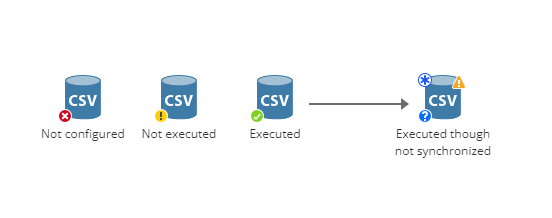
States may be informally referred to by color, i.e. red, yellow, green, and blue. For example, a green node refers to a node that has been executed.
Changing a completed node’s properties can affect its state
The general rule is that a node’s output must correspond to its current configuration.
Therefore, if you obtain some results from a node, and then later edit the node’s configuration, PolyAnalyst can no longer guarantee that the results correspond to the properties. The results are no longer said to be in sync with the configuration.
Therefore, when you reconfigure a node, PolyAnalyst deletes the older results and also reverts the node’s state from the completed state to either the ready or not-ready states.
However, there are notable exceptions to this general rule:
Upgrading PolyAnalyst may affect node state
Nodes present in projects created in earlier versions of PolyAnalyst may appear with gray-colored icons on the flowchart. When a project is opened after an upgrade, certain nodes may no longer appear in the completed state. These nodes will need to be re-executed. In some cases, due to changes in the properties of various nodes, the nodes will require additional configuration.