Connecting nodes on the flowchart
There are several different ways to connect nodes on the flowchart. Their choice depends exclusively on user preferences:
-
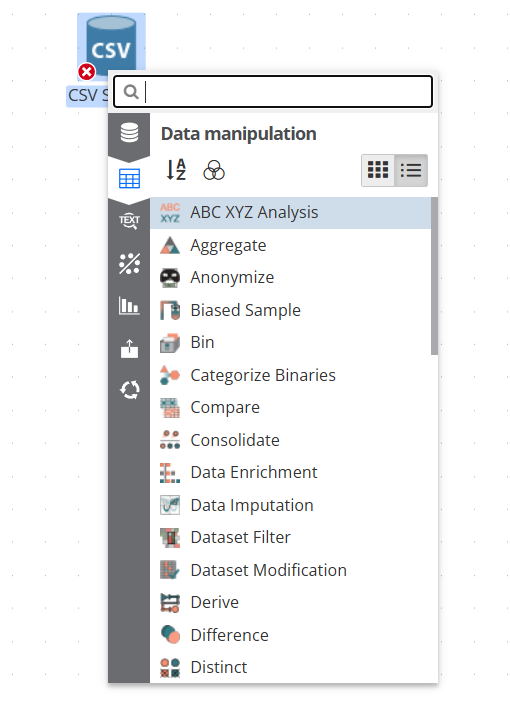
On the flowchart, select a node that can potentially become a parent for another node, right-click on it and select Add node… from its context menu. In doing so, you will have to expand the required category (or branch), and then select the required node from the list:
-
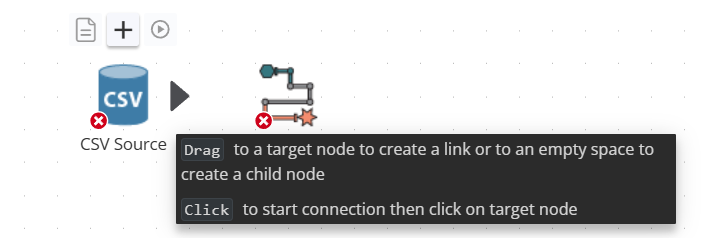
If you hover over the black arrow of a node, you will see a tooltip on connecting nodes:
-
Drag - move the cursor over the node that should become the parent node, then a black arrow will be appear. Drag the arrow to the desired child node. It is important to place the cursor right on the child node and not near it, otherwise the connection will not be established. You can also drag the arrow to any free space on the script if you want to create a child node.
-
Click - click on the parent node’s arrow to initiate a connection, then click on the node you want to connect to.
-
-
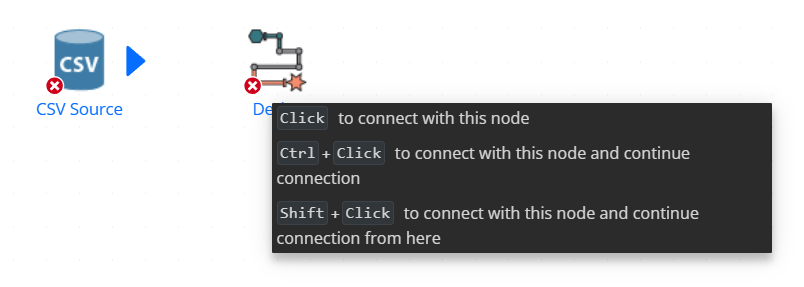
Hover over the parent node, after that a black arrow will appear. Click on the black arrow, then the node and arrow will change color to blue. Then hover over the child node, and you will see the following tooltip:
-
Click - click on the child node to connection to it.
-
Ctrl+Click - hold down the Ctrl key and click on the child node to connect to it and continue connecting the parent node to other child nodes, thus creating multiple connections between the parent node and other nodes.
-
Shift+Click - hold down the Ctrl key and click on a child node to connect the parent node to the child node and continue making a chain of connections from that node.
As long as the connection is made, you can perform some operations with it. To do this, select the connection. The link will become red:
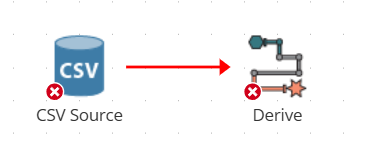
Right click on the link and select one of the options from the context menu:
-
Unlink - removes the link between the nodes; the link can also be removed by simply selecting the link and pressing the Delete button on the keyboard;
-
Go to source - the source node is selected;
-
Go to destination - the destination node is selected;
-
Insert - inserts a node from the list between the source node and the destination node.