Rule Confidence and Conflict Resolution
When one or several rules have overlapping matches, XPDL determines the best match according to the following strategy:
1) If one match is entirely contained within another, only the longest match is returned.
Example
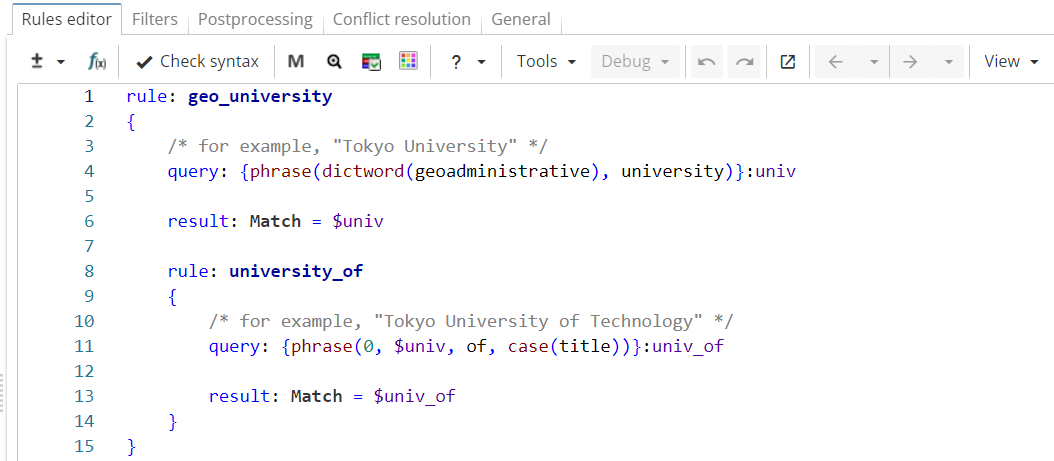
In Figure 1, the upper-level rule ("geo_university") matches university names that consist of a word from Geoadministrative dictionary followed by a word "university" (e.g. "Tokyo University"). The nested rule matches longer phrases, such as "Tokyo University of Technology".
Rule fragment
rule: geo_university
{
 /* for example, "Tokyo University" */
 query: {phrase(dictword(geoadministrative), university)}:univ

 result: Match = $univ

 rule: university_of
 {
 /* for example, "Tokyo University of Technology" */
 query: {phrase(0, $univ, of, case(title))}:univ_of

 result: Match = $univ_of
 }
}
The ruleset is run on the following text:

The rule "geo_university" matches "Osaka University" while the rule "university_of" matches larger phrase "Osaka University of Economics". The match "Osaka University" is filtered out because it is a part of the larger match "Osaka University of Economics". As a result, the ruleset returns only "Osaka University of Economics" as shown in Figure 2.

2) If several rules match partially overlapping sequences, both matches are returned.
Example
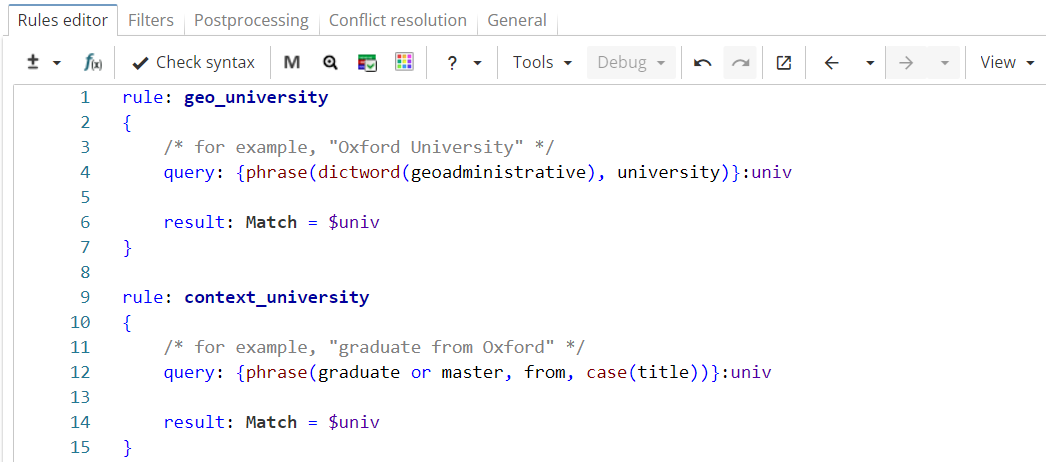
In Figure 3 the rule "geo_university" matches university names that consist of a word from Geoadministrative dictionary followed by the word "university" (e.g. "Oxford University"). The rule "context_university" retrieves short names of the universities using the contexts like "graduate from" or "student at" (e.g. "graduate from Oxford").
Rule fragment
 rule: geo_university
 {
 /* for example, "Oxford University" */
 query: {phrase(dictword(geoadministrative), university)}:univ

 result: Match = $univ
 }

 rule: context_university
 {
 /* for example, "graduate from Oxford" */
 query: {phrase(graduate or master, from, case(title))}:univ

 result: Match = $univ
 }
The ruleset is run on the following text:

The first rule matches the phrase "Yale University", while the second rule matches the partially overlapping phrase "graduated from Yale". As seen in Figure 4, both results are returned in the output.

3) If several rules match exactly the same phrase, the rule with the highest confidence value is preferred. The confidence section is optional.
The syntax is as follows:
Confidence value is used to indicate whether the rule should have priority over other rules in cases where several rules match the same sequence. The default confidence value is 1. If the confidence value is not set, the rule inherits the confidence value from its parent rule.
Note that the confidence value is not statistically calculated. It’s a manually assigned value which reflects the analyst’s subjective assessment of the rule’s ability to capture relevant matches.
If several rules have the same confidence, the rule that outputs more attributes is preferred. If the number of attributes is the same, the rule declared earlier is preferred.
Example
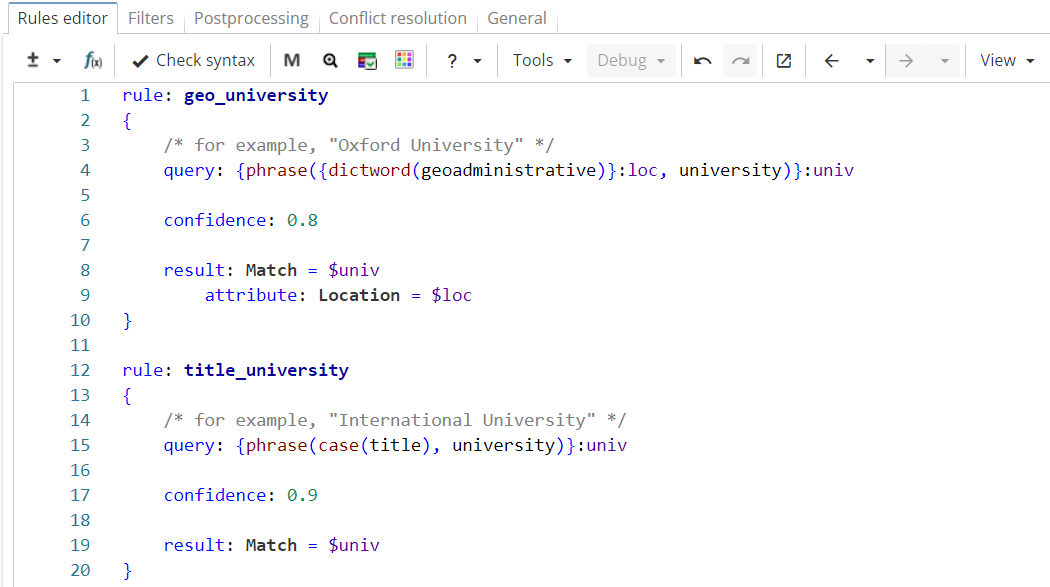
In Figure 5, the rule "geo_university" matches university names that consist of a word from the Geoadministrative dictionary followed by the word "university" (e.g. "Oxford University"). The rule also outputs the university location in a separate column. The rule "title_university" matches university names that consist of a title-cased word followed by the word "university" (e.g. "International University").
Rule fragment
 rule: geo_university
 {
 /* for example, "Oxford University" */
 query: {phrase({dictword(geoadministrative)}:loc, university)}:univ

 confidence: 0.8

 result: Match = $univ
    attribute: Location = $loc
 }

 rule: title_university
 {
 /* for example, "International University" */
 query: {phrase(case(title), university)}:univ

 confidence: 0.8

 result: Match = $univ

 }
The ruleset is run on the following text:
Both rules match exactly the same phrase "Osaka University". In this case the output of the rule "title_university" is preferred because of higher confidence value, so the "Location" column is left empty, as shown in Figure 6.

If the rule "geo_university" had higher or equal confidence value, the output would look like the result shown in Figure 7.

4) If overlapping results have different result names, all of them are returned (even if the matches are identical).
Example
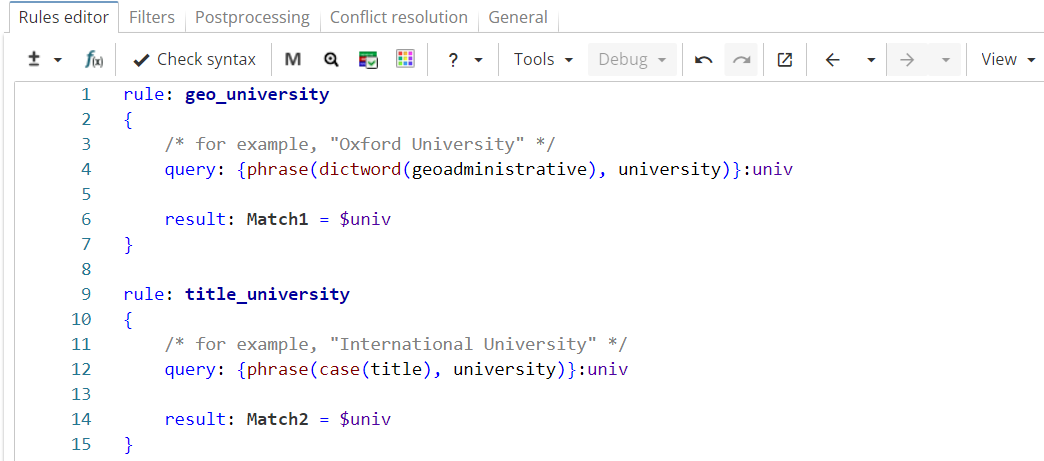
The ruleset in Figure 8, but the rules have equal confidence values and output results under different names ("Match1" and "Match2" respectively).
Rule fragment
 rule: geo_university
 {
 /* for example, "Oxford University" */
 query: {phrase(dictword(geoadministrative), university)}:univ

 result: Match1 = $univ
 }

 rule: title_university
 {
 /* for example, "International University" */
 query: {phrase(case(title), university)}:univ

 result: Match2 = $univ
 }
The ruleset is run on the following text:
Both rules match exactly the same phrase "Osaka University", but as seen in Figure 9, both results are returned because of different names.
