Using Ontologies
The function semantics() is used to search for words linked by a relation specified in an ontology.
Ontologies are dictionaries of the Semantics category which provide information on links between objects of a given domain. An ontology is a graph with the domain objects as vertices and relations between them as edges.
Ontology type |
Description |
Example |
Generic (Upper) |
Represents general concepts |
WordNet, SNePS |
Domain-specific |
Represents concepts of a particular domain |
Gene Ontology, Human Disease Ontology |
One of the most well-known generic ontologies is WordNet. It is available in PA and it has the relation types listed in the table below.
Relation type |
Definition |
Example |
meronym |
whole → part |
building → roof |
holonym |
part → whole |
roof → building |
hyperonym |
specific → generic |
certificate → document |
hyponym |
generic → specific |
document → certificate |
antonym |
concept → opposite concept |
increase → decrease |
synonym |
concept → similar concept |
increase → augment |
The PA Default ontology is domain-specific. It is related to the domain of pharmaceutics and represents the relations between different manufacturers, their products, product types and product components. The relation types are listed in the table below.
Relation type |
Definition |
Example |
is_instance |
specific → generic |
Acetaminophen → Generic Drug |
Penicillin-Class Antibacterial → Effect |
||
consists_of |
product → component |
Alka-Seltzer Plus → Acetaminophen |
Candida I → Penicillin G |
||
constitutes |
component → product |
Acetaminophen → Alka-Seltzer Plus |
Penicillin G → Candida I |
||
has_effect |
cause → effect |
Almond → Allergens |
Penicillin G Potassium → Penicillin-Class Antibacterial |
||
is_effect |
effect → cause |
Allergens → Almond |
Penicillin-Class Antibacterial → Penicillin G Potassium |
||
has_name |
product → alternative name |
Penicillin G → Penicillin G Potassium |
Penicillin G Potassium → Penicillin |
||
is_name |
alternative name → product |
Penicillin → Penicillin G Potassium |
Penicillin G Potassium → Penicillin G |
||
produced_by |
product → manufacturer |
Alka-Seltzer Plus → Bayer HealthCare, LLC |
Candida I → Viatrexx Bio Inc |
||
produces |
manufacturer → product |
Bayer HealthCare, LLC → Alka-Seltzer Plus |
Viatrexx Bio Inc → Candida I |
||
Enabling dictionaries
For the function to work properly, one should ensure that the required ontology is enabled in the node properties. In order to do that, one should right-click on the node, open its Properties and go to the Dictionaries tab. A list of available dictionary categories is in the left part of the window. Once the category Semantics is chosen, a list of available ontologies will appear in the right part of the window. In order to enable an ontology, users should select it using the check box, press the "OK" button to save the changes, and then execute the node. For more information about working with dictionaries see the chapter Working with dictionaries.
Syntax
Arguments
The first required argument is the relation_type. It takes the name of a semantic relation from one of the ontologies enabled in the node. The relation types used in the standard PA ontologies are given in the tables above.
The second required argument term is a word denoting a participant of a chosen relation. One can specify any number of arguments in the base form separated by a vertical bar, e.g. semantics(synonym, organise|organize).
The argument max_level is optional and takes a non-negative integer, which defines the distance between an argument and a word connected to in the ontology graph. For example, semantics(1, meronym, car) only returns car parts, while the query semantics(2, meronym, car) also returns its engine parts, etc.
Parameters
The function semantics() supports a number of optional named parameters listed in the table below.
Parameter |
Possible value |
Definition |
Value by default |
Example |
dictionary |
Name1| Name2|… |
Indicates the dictionaries to use. The specified dictionaries must be enabled in the node properties. |
dictionary:=WordNet |
semantics(synonym, radiate, dictionary:="WordNet"|"Default") |
collect |
last/all |
With collect:=last the function returns only the meanings(synsets) of the top or the bottom level. With collect:=all the function returns all possible synsets. |
collect:=last for "hypernym", "holonym", "antonym"; collect:=all for all other relation types |
|
max_level |
non-negative integer |
Maximum allowed distance between an argument and its related synsets; synsets located further than the indicated number of levels from the argument are excluded from the output. |
max_level:=1 for "hypernym", "holonym", "antonym"; max_level:=20 for all other relation types. |
|
min_level |
non-negative integer |
Minimum required distance between an argument and its related synsets; synsets located closer than the indicated number of levels from the argument are excluded from the output |
min_level:=0 |
See [Ex_4]. |
level |
non-negative integer |
Returns only the synsets located at the indicated distance from the argument (equivalent to "min_level:=N, max_level:=N"). |
See [Ex_5]. |
|
synset_id |
id |
Allows processing only selected synsets for a polysemous lexeme. To specify several synsets, either list their values using vertical bars as separators (synset_id:=id_1|id_2) or add several "synset_id_n"-parameters where "n" is a parameter index (e.g. synset_id:="id_1", synset_id_1:="id_2"). |
None |
The lexeme "foundation" is included in several synsets, such as "lowest support of a structure" (synset_id = 73795D9D6636B718) and "an institution supported by an endowment" (synset_id = 95294AEAEDA64D28). |
pos |
yes/no |
POS-dependent/independent search on the basis of POS-tags stated in the ontology. |
pos:=yes |
semantics(synonym, silent, pos:=no) regardless of the fact that "silent" is tagged as an adjective in the dictionary, the query matches "still" in both "The night was still" ("still" - adjective) and "There is still no change" ("still" - adverb). |
stem |
yes/no |
Takes into account/ignore the form of the word. If stem:=yes, then dictionary entries will be treated as word forms and normalized. |
stem:=no |
Let’s consider a synonym dictionary entry containing synonyms "cats", "felines" and "fluffy creatures". The query semantics(synonym, "felines", stem:=yes) does not match "cats", because firstly the algorithm normalizes the argument (felines → feline). Then it searches for "feline" in the synonym dictionary, but does not find it. To avoid this behaviour, one can pass the exact form of a word as an argument: semantics(synonym, [felines], stem:=yes). In this case the algorithm finds "felines" in the synonym dictionary and all forms of the words "cat" and "fluffy creatures" in a dataset. When dealing with multiword phrases, plural nouns are not be normalized, so the query semantics(synonym, "fluffy creatures", stem:=yes) finds "fluffy creatures" in the dictionary and then "cats" and "felines" in all forms in a dataset. |
allow_punct |
yes/no |
Takes into account/ignore punctuation marks within a synset. If allow_punct:=no, then dictionary entries containing punctuation marks will not be found by a query. |
allow_punct:=yes |
Let’s consider a semantics dictionary entry containing synonyms "disease, cerebrovascular" and "cardiovascular disease". The query semantics(hyponym, "Nervous system diseases") will find both of them. To exclude the entry with punctuation marks the query semantics(hyponym, "Nervous system diseases", allow_punct:=no) should be used. |
semantics(hyponym, foundation) returns all hyponyms of "foundation" - "fundament", "railroad bed", "philanthropic foundation", "public charity", etc.
semantics(hyponym, synset_id:=95294AEAEDA64D28) returns only hyponyms of "foundation" in the sense of "institution supported by an endowment" - "philanthropic foundation", "public charity", etc
Comments
It should be noted that ontology-based search is performed with no regard to the context, e.g. the query semantics(Meronym, building) returns "roof" in both "roof of the house" and "car roof".
Examples
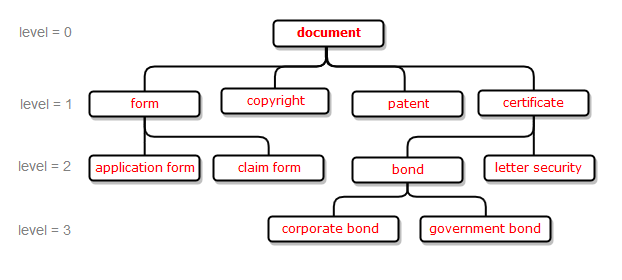
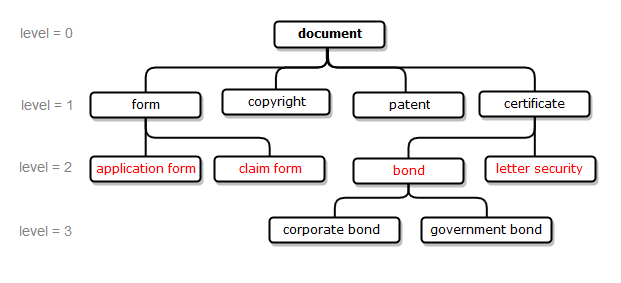
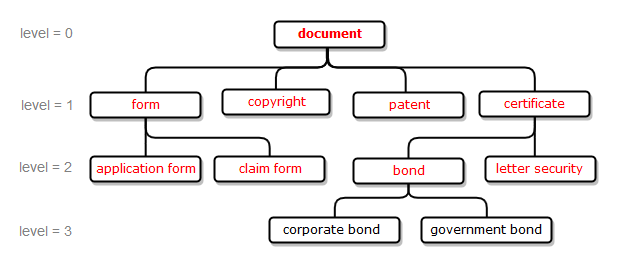
Examples [Ex_1], [Ex_2], [Ex_3], [Ex_4], [Ex_5] illustrate the work of the semantics() function with the help of a WordNet ontology excerpt. The items higlighed in red represent the results found by the example queries.
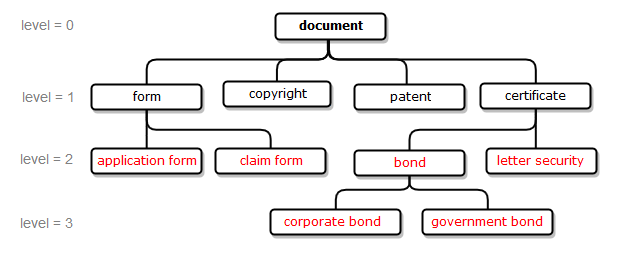
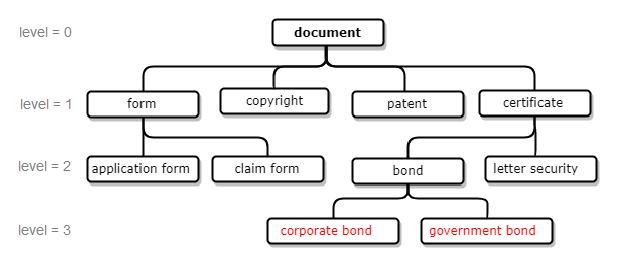
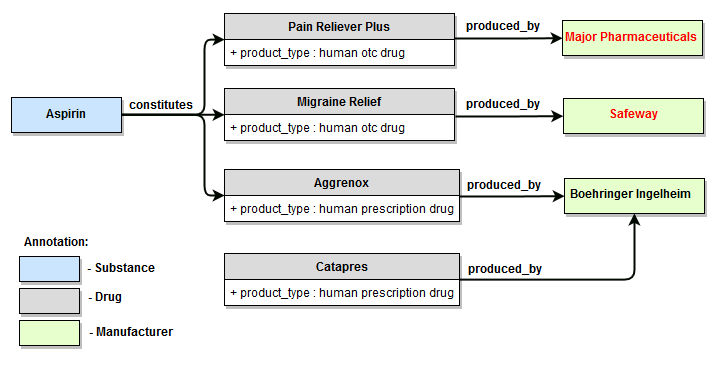
Examples [Ex_6], [Ex_7], [Ex_8], [Ex_9] illustrate the work of the semantics() function with the help of a Default ontology excerpt. The items higlighed in red represent the results found by the example queries.
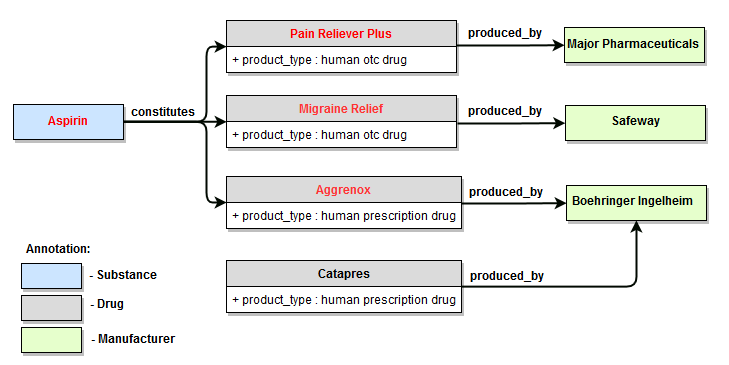
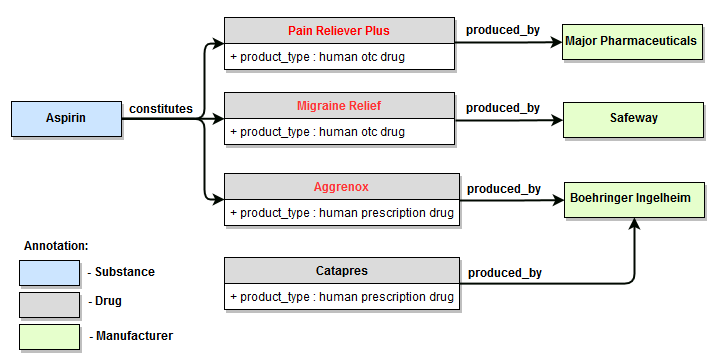
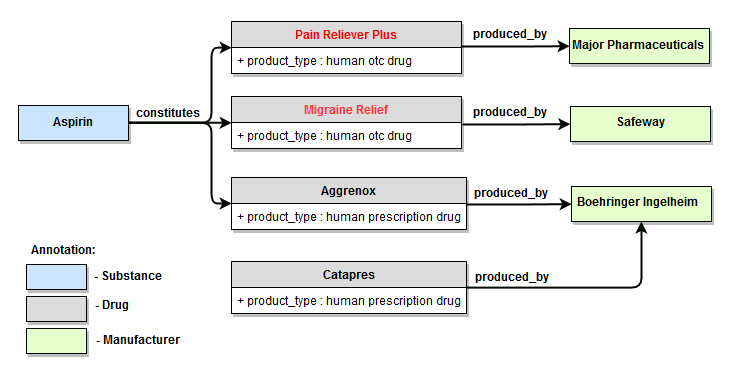
[] semantics(produced_by, semantics(constitutes, aspirin, product_type:="human otc drug", min_level:=1), min_level:=1)
Task example: Searching for car defects
In order to find which car parts are defective, it is useful to have a list with the parts. One can use external knowledge sources to form a word class of car part names. However, more effective way is to use the semantics() function and search for all the meronyms of the word "car" taking advantage of the information already available in WordNet.
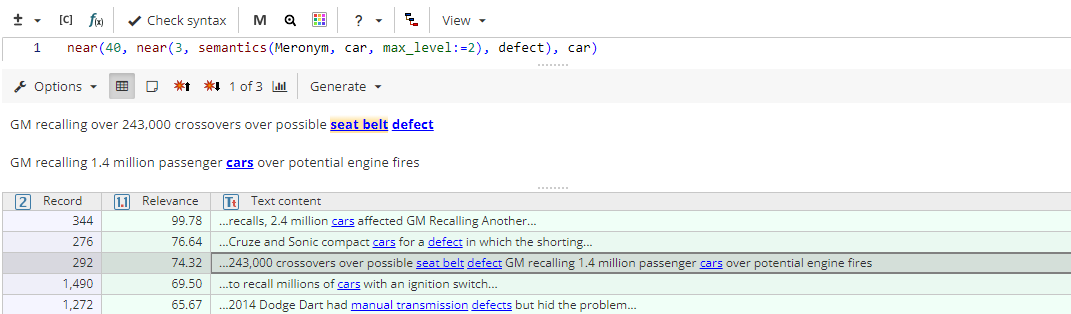
near(40, near(3, semantics(Meronym, car, max_level:=2), defect), car)
The query returns all the texts where meronyms of the word "car" are found in the range of 3 words from the word "defect". Additionally, the context is specified, so that the identified sequence is in the range of 40 words from the word "car". Specifying context helps exclude false positives, such as "train engine failure".