PolyAnalyst Application Programming Interface (version 1.0)
Overview
PolyAnalyst API allows users to interact with the PolyAnalyst server in a simple, effective and reliable way.
HTTP
The PolyAnalyst API provides an HTTP-based interface with the use of JSON as a primary data format, allowing you to choose from a wide range of programming languages. Although PolyAnalyst server supports both HTTP and HTTPS protocols, we strongly recommend you to use HTTPS for a secured connection.
Host URL
All requests should be passed to your.polyanalyst.server:port/polyanalyst/api/v1.0 (unless otherwise is stated explicitly), where your.polyanalyst.server:port represents a fully qualified domain name (or IP address) and server port of the installed PolyAnalyst server (see the server Connection settings in the Administrative Tool guide).
Version
Only one version of API is available, however multiple versions can be supported in the future. The version number (e.g. v1.0) is a part of the URL request. Versions with the same major number are guaranteed to be backward compatible.
License
To work with the PolyAnalyst 6.5 API, there must be the appropriate license on your PolyAnalyst server.
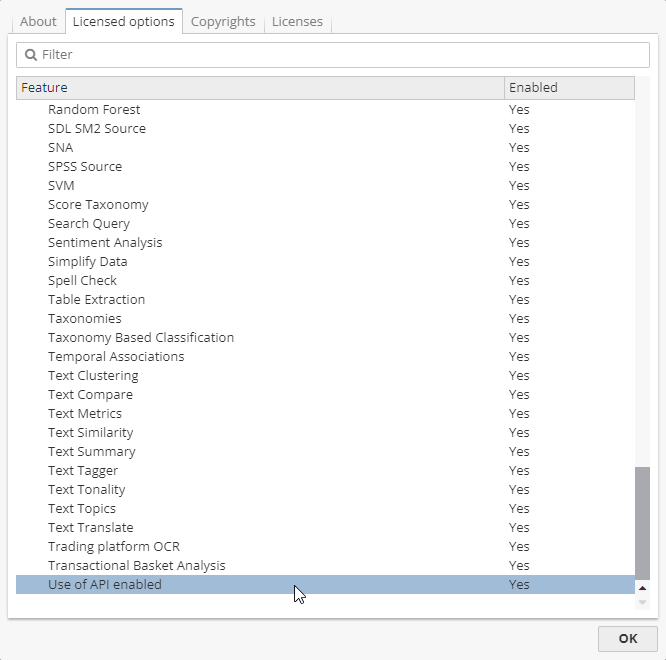
To view the features provided by your license:
-
Select About from the PolyAnalyst client Help menu;
-
Navigate to the Licensed options tab where you can see a list of options covered by the license.
As it is shown in the screenshot below, the Use of API enabled option must be enabled.
If there is no appropriate license, you will have the 403 error code return when requesting the server.
{
  "error": {
    "code": 403,
    "title": "Forbidden",
    "message": "API license required"
  }
}
More on the return codes see below.
Unix time
Note that the server events time are given in Unix seconds format and display the number of seconds since January 1, 1970, 00:00:00 UTC.
Accessing the PolyAnalyst API via cURL
To access the PolyAnalyst 6.5 API, you can use various utilities, such as cURL, Insomnia, Postman or programming languages depending on what you find more convenient to work with.
cURL is a command-line tool which is used for data transferring. The tool is based on the use of the libcurl library, i.e. free client-side URL transfer library which supports different protocols, such as FTP, FTPS, HTTP, HTTPS, LDAP, etc.
| All the examples of cURL requests are based on the use of cURL 7.55.1 (Windows) which comes by default in Windows 10 (build 17063). |
Before sending requests via cURL one should log in onto the PolyAnalyst server. To do so, use the following request in the command line.
curl --request POST --url "https://your.polyanalyst.server:port/polyanalyst/api/v1.0/login?uname=administrator" --cookie-jar "C:\New folder\my_cookie"
As you can see from the example above, first comes the cURL tool name as "curl", then there is the --request flag after which we specify the type of a method, i.e. POST in our case. Bear in mind that there is no password given for the user. Then there goes the --cookie-jar flag which specifies the path to the cookie file. This cookie file is created automatically after your logging in onto the server and is needed to be used afterwards. You can specify the name of the file by yourself, e.g. either “my.cookie” or “my_cookie”.
If there is a password required for the user under which you are about to log in, use the following request:
curl --request POST --url "https://your.polyanalyst.server:port/polyanalyst/api/v1.0/login?uname=administrator&pwd=123" --cookie-jar "C:\New folder\my_cookie"
Login procedure as a separate operation is described here.
| Be sure to create a folder first for the cookie file to be placed in. |
If there is no security certificate given for the server you are working with, use the --insecure flag.
|
Let’s have a look at a cURL request example which can be used to perform the operation of executing project nodes as it is given here.
curl ^
--request POST ^
--url "https://10.0.0.94:8014/polyanalyst/api/v1.0/login?uname=administrator&pwd=123" ^
--header "content-type: application/json" ^
--data "{"""prjUUID""": """f51ee88d-3581-4c3f-bb00-a6d4ffc3811d""", """nodes""": [{"""type""": """DataSource""", """name""": """CarData.csv"""}]}" ^
--cookie "C:\New folder\my_cookie" ^
--insecure
As you can see from the example above, a cURL request requires the use of different flags, for instance:
-
An operation flag such as
--request POSTwhich means a POST method; -
A
--headerflag which allows to specify a header of the request; -
A data flag such as
--datawhich allows to specify the data to send to the server; -
A cookie flag such as
--cookiewhich sets the path to the cookie file that was created earlier (after the login procedure).
A cookie flag --cookie can be replaced with a -b flag. Bear in mind that the -b flag is only used to read cookies but not to store them.
|
| Use full flag names for the sake of readability. |
As you can see from the example above it is also possible to use the ^ mark (for Windows) for the line break.
A cURL request demands a certain syntax as well. Thus, for example, when using a --data flag with JSON data one should pass the value after the flag with the use of curly brackets, i.e. {} and triple quotation marks.
One can use a back slash \ to escape quotation marks within a request as well.
curl --request POST --url "https://localhost:5043/polyanalyst/api/v1.0/project/execute" ^
--header "content-type: application/json" ^
--data "{\"prjUUID\": \"7f418636-35d3-4150-a414-a556252f7f0a\", \"nodes\": [{\"type\": \"DataSource\", \"name\": \"CrimeData.csv\"}]}" ^
-b "C:\New folder\my_cookie"
You can use other flags as well (with this or that syntax rule). Information on the flags is given in the cURL official documentation.
Whether you get an error of type "The revocation function was unable to check revocation for the certificate.", use the --ssl-no-revoke flag.
|
The use of tokens
It is also possible to use a token to send requests without authorization procedure. To do it, it is needed to pass the x-api-key header with a token value. A token is created by a server administrator on the Tokens page.
In case a token is not valid, you will get the 500 error code, i.e.
{
  "error": {
    "code": 500,
    "title": "",
    "message": "API key 2OL4ZH8bROWdZ21PXwaZ6 not found"
  }
}
Each token considers the use of a certain scope, i.e. restrictions which imply that a user is allowed to perform a specific operation. A value of the scope given for this or that method is described on the Tokens page as well.
If a token does not have an appropriate scope, you will get the 500 error code as well, i.e.
{
  "error": {
    "code": 500,
    "title": "",
    "message": "API key requested scopes \"view server state\" doesn't meet allowed scopes \"view report\""
  }
}
If the referrer is not allowed, another 500 error will be shown, i.e.
{
  "error": {
    "code": 500,
    "title": "",
    "message": "Referrer is not allowed for API key WsLsi1F0SzFpGjia\/Omn"
  }
}
The use of tokens must be enabled on the Server settings of the Administrative Tool beforehand (see the Login settings section).
Error codes
PolyAnalyst server will return an error code if there is an issue when processing an API request.
| Code | Response body and description |
|---|---|
400 |
Bad request error If required parameters are missing in the request or undefined parameters are used, the server can return the "400 Bad Request" code and an additional message: {
"error": {
"code": 400,
"title": "Bad Request",
"message": "Invalid query parameters"
}
}
|
403 |
Authorization error Most requests can be proceeded only after authorization. The server performs its operations with the session identifiers (SID), i.e. unique numbers assigned by the PolyAnalyst server to the session. By default, a session is not assigned to any user account (unauthorized). To assign a session to an account the login procedure must complete successfully. The session has a timeout (see the server Connection settings in the Administrative Tool guide) and after a specified period of inactivity the user is automatically logged out. If the request has been sent with an unauthorized session identifier, the server will return the "403 Forbidden code" with an additional message: {
"error": {
"code": 403,
"title": "Authorization Required",
"message": "You are not logged in to PolyAnalyst Server."
}
}
|
403 |
Limited access error Some requests demand the user to have administrator rights, otherwise the "403 error" will be returned. {
"error": {
"code": 403,
"title": "",
"message": "Access to this operation is limited to administrators."
}
}
|
404 |
Not Found error Errors of this type often appear if a request has an invalid URL. In this case the server will return the "404 Not Found" code. Please check the requested URL. |
503 |
Service Unavailable error Sometimes (very rarely) when the server is under heavy load, a request can be finished with the "503 Service Unavailable" code. {
"error": {
"code": 503,
"title": "Service Unavailable",
"message": "PABUSY"
}
}
|
500 |
Errors of other types (Internal Server Error) All other types of errors are grouped under the "500 Internal Server Error" code. An error message helps to identify the error’s origin. For example, the message below tells us about invalid request parameters: {
"error": {
"code": 500,
"title": "",
"message": "Empty passwords are not supported for LDAP"
}
}
|