Project autosaving
PolyAnalyst can be configured to automatically save open projects periodically. This is performed by each user by editing user preferences.
Open the User settings dialog from the Settings menu in the Analytical Client and navigate to the General section in Default project settings. Locate the Auto-save interval (minutes) option.
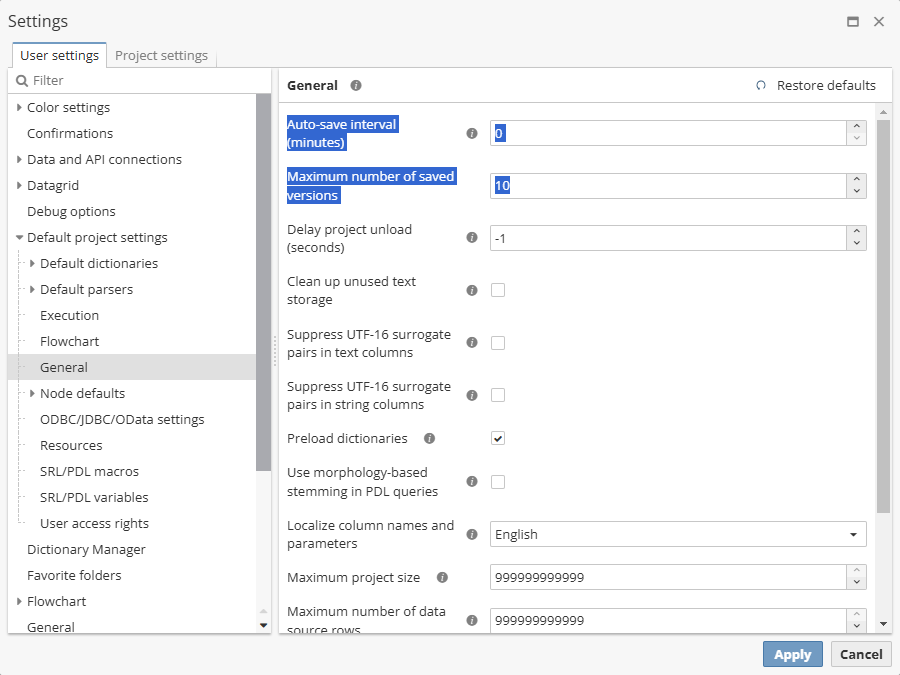
The option represents the number of minutes.
The Maximum number of saved versions is used to specify how many backup versions of projects PolyAnalyst should save. The default value is 10.
| The Maximum number of saved versions option applies only to explicitly saved copies of the project (saved by user). |
| Even if that the value of the Auto-save interval option is set to 0, a project will be saved by default though every new version of the project will be saved upon the latest one thus overwriting the last saved version. |
Remember that PolyAnalyst has a complex system of overlapping settings: if the options described above are configured via User settings, they are applied to all the new projects of the user. If they are configured via Project settings, they will be applied only to the currently open project.
Click OK or Apply to save the changes.